Prestige IDE icon

Free · Open source · Windows 11

Code with your own models

Prestige IDE is an agentic coding IDE. Ask it to build, fix or explain: it reads your code, edits files, runs PowerShell and checks its work, all on your PC with the models Prestige runs. No accounts, no cloud, no API keys.

Free forever · MIT license · All releases and notes

Four elements, one workbench

The same alchemy as Prestige, pointed at your code.

Fire the agent

  • Agent loop. It reads, searches, edits, runs commands and keeps going until the job is done, then says what it changed and how it checked.
  • Subagents. Research jobs go to a helper with a fresh context, so the main conversation stays small.
  • Slash commands. /init, /review, /commit, /pr, /plan, /rewind and your own.
  • Scheduled runs. Nightly tests, a dependency check or a morning summary on a timetable.
  • Preview. It starts your dev server, screenshots the page and reads its console errors to check its own UI work.

Earth safety

  • Permission modes. Ask before edits, Accept edits, Plan mode or Bypass, switched with Shift+Tab.
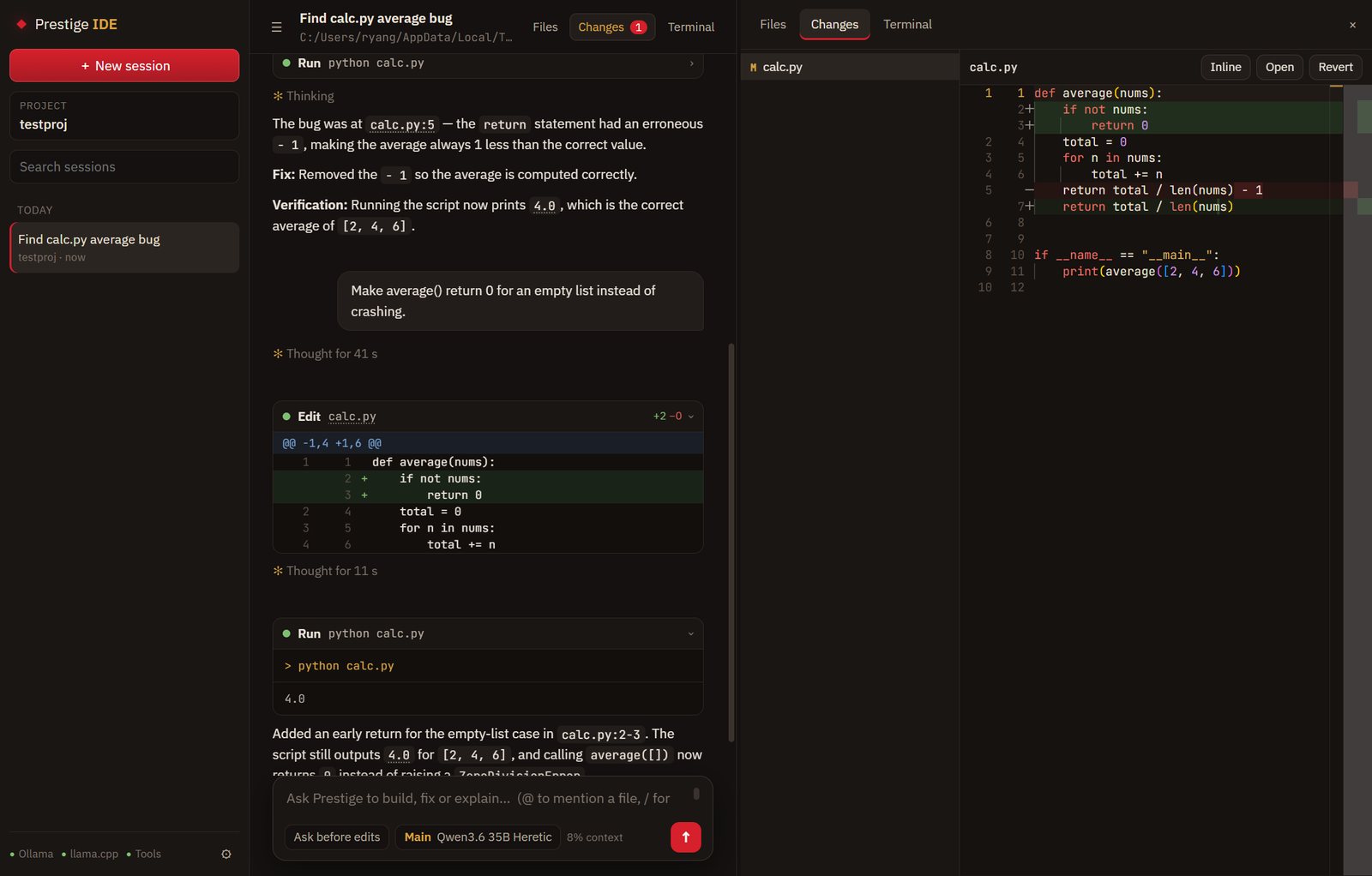
  • See it first. Every edit and command shows before it runs, with a diff.
  • Checkpoints and rewind. Every message is a checkpoint; rewind puts every changed file back.
  • Rules and hooks. Allow and deny rules plus PowerShell hooks in .prestige/settings.json.
  • Guarded reads. Reading outside the project or fetching a new site asks first.

Water the workspace

  • Files and Monaco editor. Folder tree, tabs, syntax colouring and Ctrl+S.
  • Changes pane. Every file the session touched, diffed side by side, with Revert.
  • Real terminals. PowerShell in tabs, opened in the project folder.
  • Git built in. Branch chip, pull, push, and new sessions in their own worktree.
  • Notebooks. .ipynb files read and edited one cell at a time.

Air your models

  • Model tiers. Deep, Main, Fast and Mini, each mapped to any Ollama or llama.cpp model.
  • Pictures. Paste screenshots and mockups for vision models.
  • Thinking on or off. Off, the same bug fix took 40 seconds instead of about 2½ minutes.
  • Context that lasts. At 80% the conversation is summarised and the work carries on.
  • MCP tools. Everything in Prestige's tool store becomes agent tools.

Install

Windows 11, with Prestige installed and set up: the IDE uses the AI engines and models Prestige runs. Tested with Qwen3.6 35B-A3B at about 29 tokens a second on an RTX 3060 12 GB.

  1. Set up Prestige first if you haven't. Its Setup installs Ollama, llama.cpp and the models.
  2. Download Prestige.IDE_<version>_x64-setup.exe with the button above, or from the Releases page, and run it.
  3. Open a project folder and ask for something. If the models aren't running, Start in the status line brings them up. Prestige can also open the IDE from its top bar.

Seeing "Windows protected your PC"? Windows SmartScreen warns about new apps it hasn't seen many downloads of yet. Click More info, then Run anyway.

Uninstall

Open Windows Settings → Apps → Installed apps, find Prestige IDE and choose Uninstall. Sessions and settings are in %APPDATA%\com.rgstudios.prestige-ide; tick Delete the application data in the uninstaller to remove them too. Your projects and Prestige are left alone.